QuickStart Example 1: one public WSI
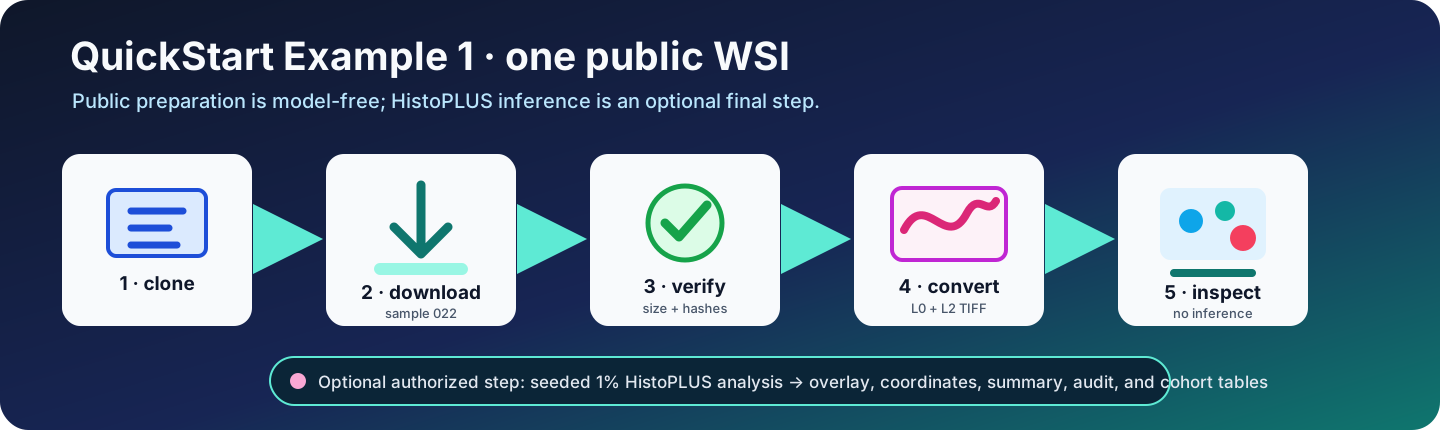
This tutorial downloads one public lymphoma WSI, validates its identity, converts Motic MDS levels L0 and L2 to TIFF, inspects the slide, and optionally runs a deterministic 1% HistoPLUS analysis.
Fixed public sample
| Item | Value |
|---|---|
| Zenodo record | 21466410 |
| Sample | TumorQuantAI_LymphomaWSI_022 |
| Download size | 125350400 bytes |
| MD5 | 94bb5b08ccf1957f8c42a579e8b33cfb |
| SHA-256 | db2988b5c6bc791510cec4127106509e604e577feafdb15b94c149043ed7067a |
| Source MPP | 0.261780 µm/pixel |
| Converted levels | L0 and L2 |
| Optional inference | Seeded 1% of detected tissue tiles |
Public download and preparation need no Zenodo credential. HistoPLUS access is required only for inference.
1. Clone and install
Choose one installation command. Docker is shown first.
# Clone TumorQuantAI and enter the repository.
git clone https://github.com/cfarkas/tumorquantai.git
cd tumorquantai

# Install the command and Docker route.
./tumorquantai install --docker

# Make the installed command available in this terminal.
export PATH="$HOME/.local/bin:$PATH"
Alternative installation commands are:
# Install for Singularity or Apptainer.
./tumorquantai install --singularity

# Install through Poetry; Docker is the default scientific backend.
./tumorquantai install --poetry

# Install for Conda.
./tumorquantai install --conda
Run only the command for the route you will use.
2. Preview the plan
# Print the bounded one-slide plan without downloading.
tumorquantai quickstart --dry-run
The default directory is .tumorquantai-quickstart-one-wsi, beside the cloned repository. The command prints its resolved location. Use --output /another/directory only when a different filesystem is needed.
3. Download, verify, convert, and inspect
# Prepare sample 022 without running HistoPLUS.
tumorquantai quickstart --no-inference
This single command downloads the authoritative manifest and sample 022, verifies size, MD5, and SHA-256, converts L0/L2 with resumable state, writes samples.csv, performs model-free inspection, and creates START_HERE.html.
4. Verify the preparation
# Verify the default QuickStart directory.
python3 examples/quickstart/verify_outputs.py --preparation-only
Open first:
.tumorquantai-quickstart-one-wsi/START_HERE.html
5. Configure HistoPLUS access
Follow Configure authorized HistoPLUS access. Never place a token value on the command line or commit a model weight.
# Recheck the computer and authorized model-access path.
tumorquantai doctor --online
6. Run the one-slide 1% analysis
Choose one execution command:
Docker
# Run QuickStart #1 through Docker on CPU.
tumorquantai quickstart --docker --cpu
Singularity or Apptainer
# Run QuickStart #1 through Singularity or Apptainer on CPU.
tumorquantai quickstart --singularity --cpu
Poetry
# Run from the Poetry environment with Docker.
poetry run tumorquantai quickstart --docker --cpu
The global command installed by ./tumorquantai install --poetry is equivalent:
# Run the Poetry-installed global command with Docker.
tumorquantai quickstart --docker --cpu
Conda
# Run QuickStart #1 through the versioned Conda environment.
tumorquantai quickstart --conda --cpu
Use a GPU only after the selected container runtime and NVIDIA device pass tumorquantai doctor.
7. Verify inference outputs
# Verify the overlay, summary, coordinates, counts, and audit.
python3 examples/quickstart/verify_outputs.py
Review in this order:
.tumorquantai-quickstart-one-wsi/START_HERE.html- the one-slide cell-type overlay;
summary.json;class_counts.csvand cell coordinates;sample_aggregation_audit.csv.
The counts describe the selected 1% of detected tissue tiles. Do not multiply them by 100.
Stop and resume
Press Ctrl+C to stop. Repeat the same command. Verified downloads, converted TIFFs, and valid Nextflow tasks are reused.
# Download and verify only.
tumorquantai quickstart --download-only

# Convert an already verified download.
tumorquantai quickstart --convert-only

# Regenerate preparation and inspection without inference.
tumorquantai quickstart --no-inference