Input files and physical scale
TumorQuantAI accepts exported TIFF whole-slide images for analysis. Public Motic MDS tutorial files are converted to TIFF before inspection or inference.
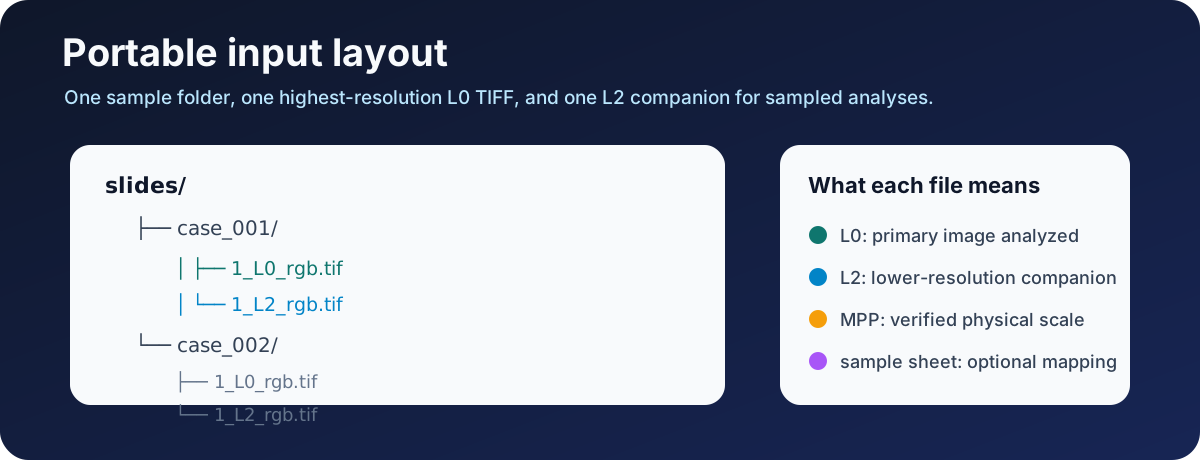
Recommended TIFF layout
slides/
├── case_001/
│   ├── 1_L0_rgb.tif
│   └── 1_L2_rgb.tif
└── case_002/
    ├── 1_L0_rgb.tif
    └── 1_L2_rgb.tif
| Item | Purpose |
|---|---|
| L0 TIFF | Highest-resolution primary image analyzed |
| L2 TIFF | Lower-resolution companion used by sampled reports and collages |
| Source MPP | Physical size of one L0 pixel in micrometres |
| Target MPP | Scale used for model tiles; separate from source MPP |
The default discovery patterns select *_L0_rgb.tif and *_L0_rgb.tiff as primary slides. Companion L2 files are not treated as independent samples.
Inspect before inference
# Inspect the slide folder without loading HistoPLUS.
tumorquantai inspect /path/to/slides \
  --output /path/to/tumorquantai-inspection
When TIFF metadata does not contain a verified scale:
# Supply the verified source MPP during inspection.
tumorquantai inspect /path/to/slides \
  --output /path/to/tumorquantai-inspection \
  --source-mpp 0.261780
TumorQuantAI stops when required physical scale cannot be established. Do not guess an MPP or copy it from another scanner, export, or slide.
Sample sheets
A sample sheet is recommended when filenames are complex or sample IDs must be controlled.
sample_id,slide_path
case_001,/path/to/slides/case_001/1_L0_rgb.tif
case_002,/path/to/slides/case_002/1_L0_rgb.tif
Create and inspect it:
# Create a sample sheet with stable research IDs.
cat > /path/to/slides/samples.csv <<'CSV'
sample_id,slide_path
case_001,/path/to/slides/case_001/1_L0_rgb.tif
case_002,/path/to/slides/case_002/1_L0_rgb.tif
CSV

# Inspect the exact manifest roster.
tumorquantai inspect /path/to/slides \
  --sample-sheet /path/to/slides/samples.csv \
  --output /path/to/tumorquantai-inspection \
  --source-mpp 0.261780
See Input manifest schema for optional columns and exact validation behavior.
Supported primary-slide patterns
Use --pattern when exported L0 files use another controlled name:
# Inspect primary TIFFs matching a custom pattern.
tumorquantai inspect /path/to/slides \
  --output /path/to/tumorquantai-inspection \
  --pattern '*_highest_resolution.tif' \
  --source-mpp 0.261780
Repeat --pattern for more than one accepted primary naming scheme. Avoid broad patterns such as *.tif when companion pyramid levels are in the same tree.
Motic MDS tutorial files
The public lymphoma dataset uses .mds containers. These are source files, not direct TumorQuantAI inference inputs. Convert them to L0/L2 TIFFs:
# Convert verified public MDS files to L0 and L2 TIFFs.
python bin/mds_to_tiff.py \
  --input /path/to/mds-files \
  --manifest /path/to/tumorquantai_lymphoma_mds_manifest.csv \
  --output-dir /path/to/slides \
  --levels 0 2 \
  --source-mpp 0.261780 \
  --resume
The converter validates selected files against the manifest and writes samples.csv for the converted roster.
Source MPP versus target MPP
Source MPP describes the input slide. Target MPP describes the scale presented to HistoPLUS. A typical run records both:
source_mpp = 0.261780 µm/pixel
model_target_mpp = 0.5 µm/pixel
TumorQuantAI uses the source scale to extract model tiles at the correct physical size. Changing the target MPP does not repair an incorrect source MPP.
Read Source versus target MPP before using a custom scale.
Input fingerprints
The workflow records fingerprints for primary slides and relevant companions. A changed input file changes the task identity and prevents unsafe reuse of an older cached result.
Keep the original slide, converted TIFFs, sample sheet, inspection manifest, and source-MPP provenance with the analysis.
Privacy and naming
Use non-identifying research sample IDs. Do not place protected health information in:
- directory names;
- TIFF filenames;
- sample sheets;
- output paths;
- screenshots or issue attachments.