Full tutorial: 12 public Illumina libraries
Download the complete 12-run PRJNA754199 archive, create a sample table, and run a copy-number analysis with research reports. No custom script or Python programming is needed. For a smaller first test, use QuickStart 1.
Terminal / headless version: all blocks below run in a terminal; no browser is required. Follow download, checksum, setup, check and run in order.
Before you start
Follow installation. This tutorial uses Conda; other backends use the same configuration. Allow about 150 GiB of free working space and several hours. FASTQs total 5.75 GiB; the first run also downloads approximately 8.0 GiB of prebuilt hg38 indexes. Fewer reads do not remove the RAM requirement for the reference; check requirements.
Replace /path/to/my/analyses_dir/ with your analysis folder in every block.
Use a new oncotracer-prjna754199 folder for this tutorial. Paste each block in
order and resolve any error before continuing. Command help.
cd /path/to/my/analyses_dir/
oncotracer system --path "$PWD/oncotracer-prjna754199"
oncotracer doctor --backend conda
The data are single-end Illumina HiSeq 2500 reads, 36 bases each: 266,097,582
reads and 9,579,512,952 bases in total. DDLPS_* and WDLPS_* are archive sample
aliases, not independently verified diagnoses or 12 independent patients.
The original study included more specimens than this public archive. This is
an hg38/qDNAseq reanalysis, not a reproduction of its GRCh37 Plasma-Seq workflow.
Dataset provenance.
1. Download the FASTQs
Each curl downloads one library and names it after its archive alias so batch
setup can match it. --fail reports server errors, --location follows download
redirects, --continue-at - resumes an interrupted download, and --output
sets the saved filename. The manifest records the original accession, size and checksum.
cd /path/to/my/analyses_dir/
mkdir -p oncotracer-prjna754199/input/fastq

curl --fail --location \
  --output oncotracer-prjna754199/manifest.tsv \
  https://raw.githubusercontent.com/cfarkas/oncotracer/v2.0.0/examples/prjna754199/manifest.tsv
curl --fail --location --continue-at - \
  --output oncotracer-prjna754199/input/fastq/DDLPS_1a.fastq.gz \
  https://ftp.sra.ebi.ac.uk/vol1/fastq/SRR158/036/SRR15871436/SRR15871436.fastq.gz
curl --fail --location --continue-at - \
  --output oncotracer-prjna754199/input/fastq/DDLPS_1b.fastq.gz \
  https://ftp.sra.ebi.ac.uk/vol1/fastq/SRR158/035/SRR15871435/SRR15871435.fastq.gz
curl --fail --location --continue-at - \
  --output oncotracer-prjna754199/input/fastq/DDLPS_1c.fastq.gz \
  https://ftp.sra.ebi.ac.uk/vol1/fastq/SRR158/032/SRR15871432/SRR15871432.fastq.gz
curl --fail --location --continue-at - \
  --output oncotracer-prjna754199/input/fastq/DDLPS_2.fastq.gz \
  https://ftp.sra.ebi.ac.uk/vol1/fastq/SRR158/031/SRR15871431/SRR15871431.fastq.gz
curl --fail --location --continue-at - \
  --output oncotracer-prjna754199/input/fastq/DDLPS_3a.fastq.gz \
  https://ftp.sra.ebi.ac.uk/vol1/fastq/SRR158/030/SRR15871430/SRR15871430.fastq.gz
curl --fail --location --continue-at - \
  --output oncotracer-prjna754199/input/fastq/DDLPS_3b.fastq.gz \
  https://ftp.sra.ebi.ac.uk/vol1/fastq/SRR158/029/SRR15871429/SRR15871429.fastq.gz
curl --fail --location --continue-at - \
  --output oncotracer-prjna754199/input/fastq/WDLPS_1a.fastq.gz \
  https://ftp.sra.ebi.ac.uk/vol1/fastq/SRR158/028/SRR15871428/SRR15871428.fastq.gz
curl --fail --location --continue-at - \
  --output oncotracer-prjna754199/input/fastq/WDLPS_1b.fastq.gz \
  https://ftp.sra.ebi.ac.uk/vol1/fastq/SRR158/027/SRR15871427/SRR15871427.fastq.gz
curl --fail --location --continue-at - \
  --output oncotracer-prjna754199/input/fastq/WDLPS_1c.fastq.gz \
  https://ftp.sra.ebi.ac.uk/vol1/fastq/SRR158/026/SRR15871426/SRR15871426.fastq.gz
curl --fail --location --continue-at - \
  --output oncotracer-prjna754199/input/fastq/WDLPS_1d.fastq.gz \
  https://ftp.sra.ebi.ac.uk/vol1/fastq/SRR158/025/SRR15871425/SRR15871425.fastq.gz
curl --fail --location --continue-at - \
  --output oncotracer-prjna754199/input/fastq/WDLPS_2.fastq.gz \
  https://ftp.sra.ebi.ac.uk/vol1/fastq/SRR158/034/SRR15871434/SRR15871434.fastq.gz
curl --fail --location --continue-at - \
  --output oncotracer-prjna754199/input/fastq/WDLPS_3.fastq.gz \
  https://ftp.sra.ebi.ac.uk/vol1/fastq/SRR158/033/SRR15871433/SRR15871433.fastq.gz
2. Check the downloads
The checksums below identify the exact archived files. Continue only when
all 12 lines say OK. If a download was interrupted, repeat its curl
command first. A completed file that fails its checksum must be downloaded
again to a new filename and checked; do not analyze it.
cd /path/to/my/analyses_dir/
md5sum -c <<'MD5'
31e5afa5d0433a693c4bb64de7f84e8e  oncotracer-prjna754199/input/fastq/DDLPS_1a.fastq.gz
fd8884a91fb38f8997081efb46c773c5  oncotracer-prjna754199/input/fastq/DDLPS_1b.fastq.gz
851f7a9e680102cc7a93c535f3192e84  oncotracer-prjna754199/input/fastq/DDLPS_1c.fastq.gz
5f827e9c26e835ffcfe9e64c1dc29b61  oncotracer-prjna754199/input/fastq/DDLPS_2.fastq.gz
130081581524cb80090640c981a823e6  oncotracer-prjna754199/input/fastq/DDLPS_3a.fastq.gz
291c9ba517db6ec0e8d55c6212390b16  oncotracer-prjna754199/input/fastq/DDLPS_3b.fastq.gz
eddefeae830963ffa86f7cd59638659d  oncotracer-prjna754199/input/fastq/WDLPS_1a.fastq.gz
528812a6cf90cc65cb0c57c6085019b9  oncotracer-prjna754199/input/fastq/WDLPS_1b.fastq.gz
b366d25c230d36e613b04948deca575a  oncotracer-prjna754199/input/fastq/WDLPS_1c.fastq.gz
0f714f53bb8c6c811df58daeff214c0e  oncotracer-prjna754199/input/fastq/WDLPS_1d.fastq.gz
e7b9d772620bd08602881247fcec4a3f  oncotracer-prjna754199/input/fastq/WDLPS_2.fastq.gz
07243c418d787c2b90064e29a20fd1c6  oncotracer-prjna754199/input/fastq/WDLPS_3.fastq.gz
MD5
3. Create the samplesheet
Paste the entire block through the final CSV line. This creates the two-column
sample table; no text editor is needed. cat > replaces this file if it exists.
One row represents one library. TUMOR is a workflow label, not a claim about
the amount or presence of tumor DNA in that specimen.
cd /path/to/my/analyses_dir/
cat > "$PWD/oncotracer-prjna754199/input/fastq/samples.csv" <<'CSV'
sample_name,status
DDLPS_1a,TUMOR
DDLPS_1b,TUMOR
DDLPS_1c,TUMOR
DDLPS_2,TUMOR
DDLPS_3a,TUMOR
DDLPS_3b,TUMOR
WDLPS_1a,TUMOR
WDLPS_1b,TUMOR
WDLPS_1c,TUMOR
WDLPS_1d,TUMOR
WDLPS_2,TUMOR
WDLPS_3,TUMOR
CSV
4. Save the settings
cd /path/to/my/analyses_dir/
oncotracer auto \
  --mode illumina \
  --reads-folder "$PWD/oncotracer-prjna754199/input/fastq" \
  --sample-table "$PWD/oncotracer-prjna754199/input/fastq/samples.csv" \
  --config-dir "$PWD/oncotracer-prjna754199/config" \
  --outdir "$PWD/oncotracer-prjna754199/results" \
  --hg38_build \
  --threads 4 \
  --run-cna-classifier \
  --cna-classifier-sample-set sarcoma \
  --no-pathology-models
--reads-folder selects the downloaded files; --sample-table selects their
labels. --config-dir stores settings and the generated four-column samplesheet;
--outdir stores results. --threads 4 requests four CPU workers; increase it
only if your system has spare resources.
The final three flags add copy-number reports using the study's sarcoma context, without biomedical-model downloads. Web/LLM enrichment is off. The optional GISTIC2 cohort analysis is enabled by the report defaults; a GISTIC2 failure is reported but is not fatal. These settings do not infer a sarcoma diagnosis.
The hg38 path is optional. Replace --hg38_build with
--hg38_build /path/to/prepared/reference to reuse indexes, or with
--build_reference to build your own on CPU. Do not combine the options.
Automatic download is the default; auto itself downloads no reference files.
Reference choices.
Expect Selected samples: 12 (12 TUMOR, 0 NORMAL). The generated
config/illumina.samplesheet.csv must have an empty fastq_2 column for every
row because these are single-end libraries.
5. Check, then run
cd /path/to/my/analyses_dir/
oncotracer check --config "$PWD/oncotracer-prjna754199/config/illumina.auto.yml"
Confirm all 12 names and resolve errors before starting:
cd /path/to/my/analyses_dir/
oncotracer run --backend conda \
  --config "$PWD/oncotracer-prjna754199/config/illumina.auto.yml"
Keep the terminal open. Success ends with OncoTracer native analysis completed:.
To continue an interrupted run, repeat the command above. Completed steps are reused.
6. Review the results
cd /path/to/my/analyses_dir/
cat "$PWD/oncotracer-prjna754199/results/06_workflow_summary/workflow_summary.txt"
cat "$PWD/oncotracer-prjna754199/results/01_samurai_illumina/qdnaseq/qdnaseq_sample_status.json"
The summary should identify mode=illumina, engine=native and
nextflow_used=false. The sample-status file should list all 12 under
completed_samples, with none under failed_samples. If samples failed, do
not treat the cohort as complete. See troubleshooting.
Open below results/ |
What it tells you |
|---|---|
01_samurai_illumina/qdnaseq/plots/ |
Copy-number profile for each library |
03_cna_codification/cna_events.tsv |
Final gains and losses to inspect |
04_cna_custom_plots/cna_per_sample_pages.pdf |
Per-sample plots in one PDF |
05_cna_classifier/final_report.html |
Matched knowledge HTML/PDF reports and combined PDF |
05_cna_classifier/cohort_report.html |
Research interpretation; open in a browser |
05_cna_classifier/clinician_report.html |
Per-sample research reports |
A completed run is not a diagnosis. Examine read quality, coverage and the underlying copy-number tables before interpreting a report. No pathology table is supplied here. How to read outputs.
Keep the input manifest, samples.csv, the complete config/ directory, results,
and oncotracer provenance --json output. Results include the command trace at
.oncotracer-native/trace.tsv and the run record at
06_workflow_summary/native_run_manifest.json.
Representative gallery
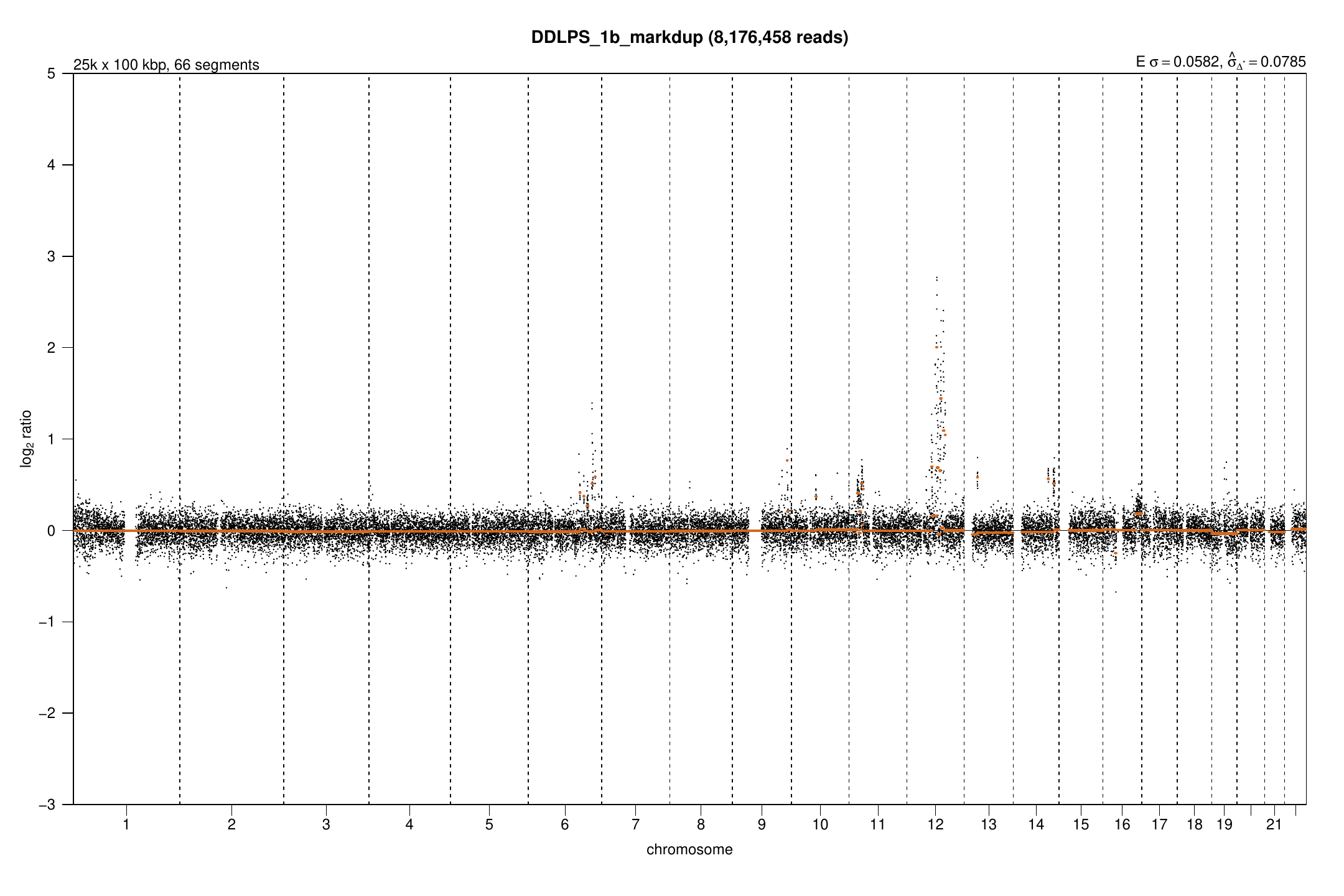
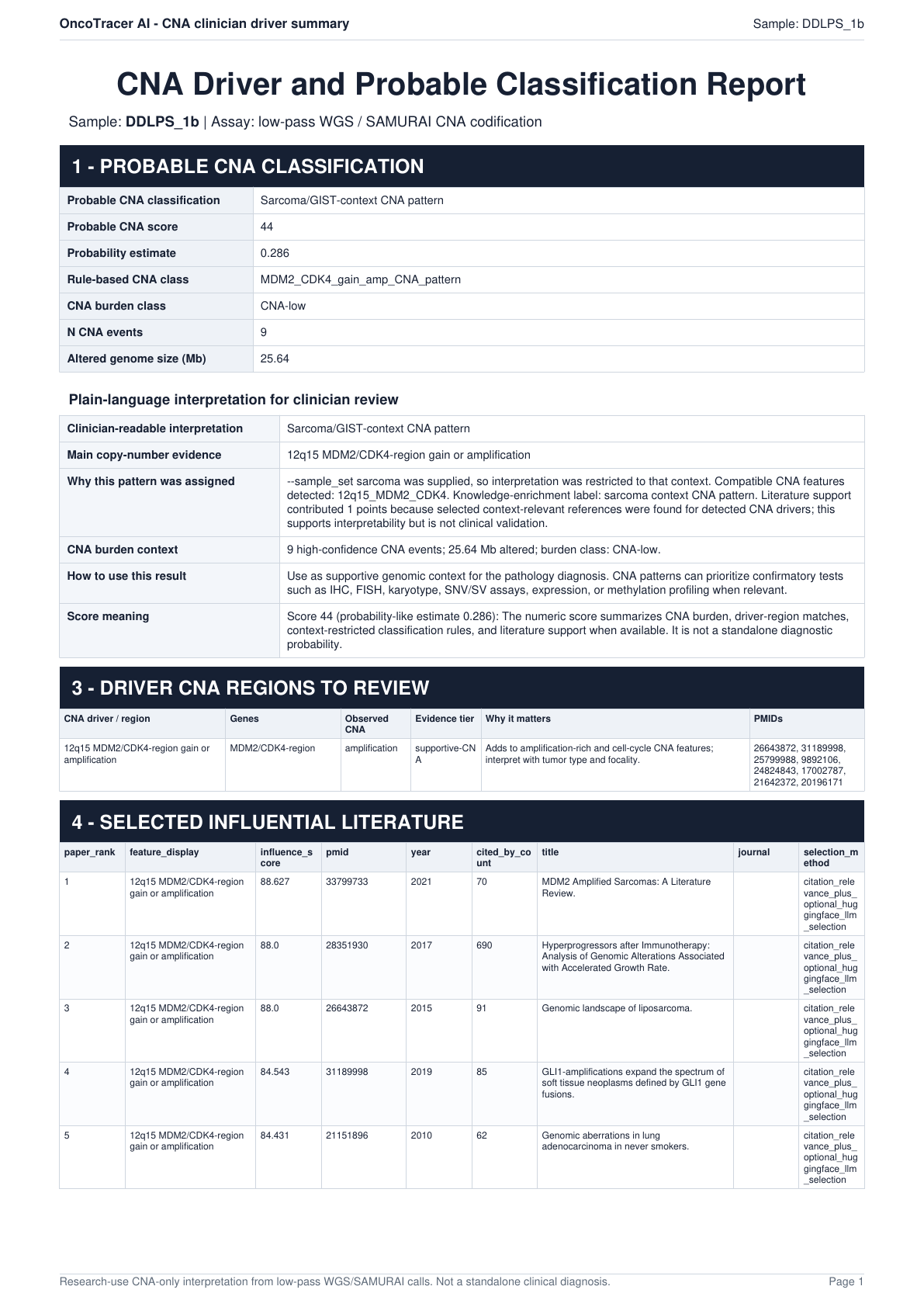
These are previously generated research examples, not guaranteed results for every run. Black points show normalized signal; horizontal lines show fitted copy-number segments.
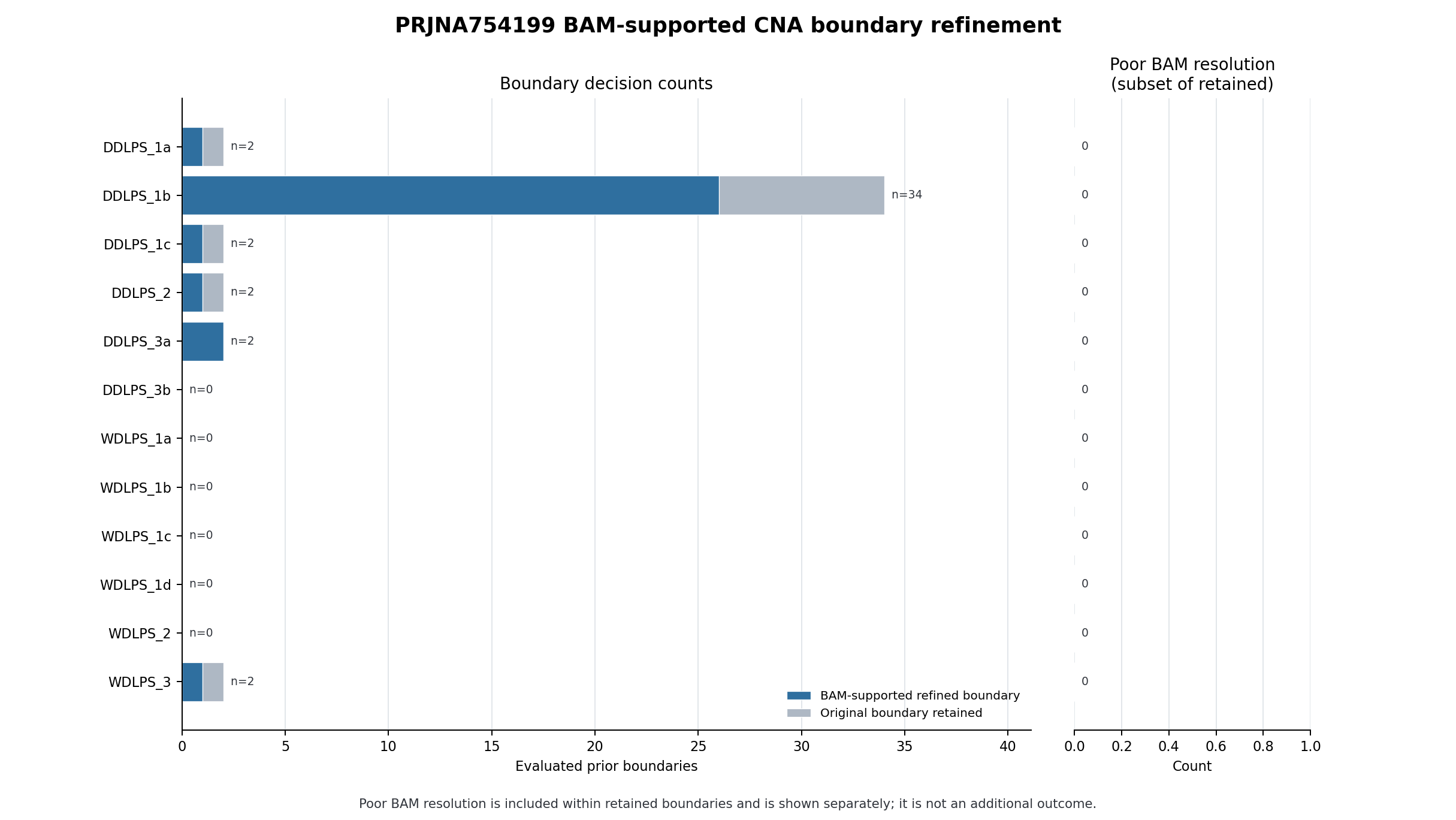
Source boundary-refinement table.
Primary sources and limits
The NCBI BioProject, ENA archive, and Przybyl et al. (2022) describe the source data. OncoTracer is not a standalone diagnostic system or medical device. Do not use this tutorial alone to diagnose disease or choose treatment.